HEIC to JPG Converter
Dumpper V.80.8 26 -
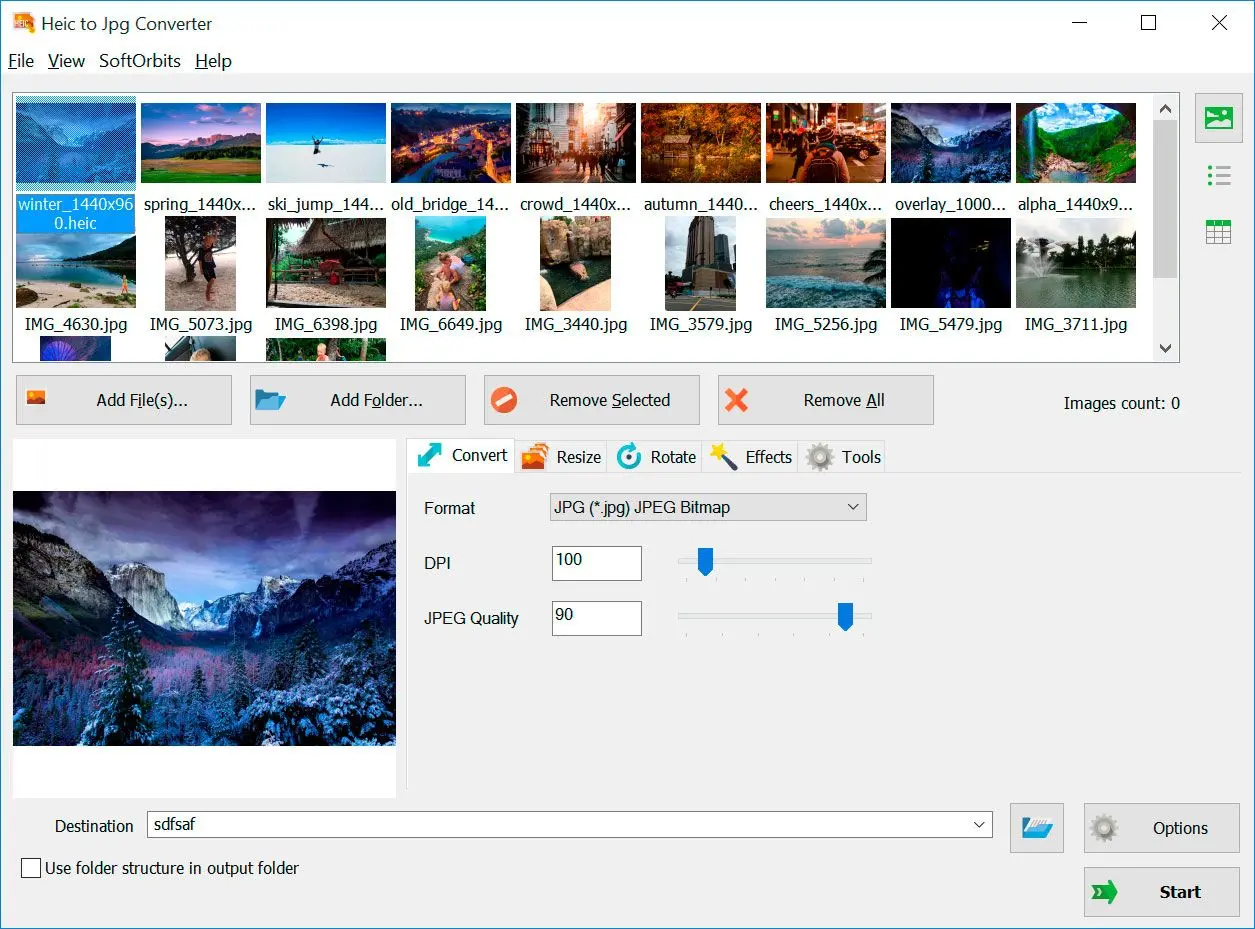
Загрузите конвертер HEIC в JPG для Windows 10, 11. Преобразуйте файлы HEIC в JPG в пакетном режиме с полной поддержкой цветовых профилей HDR.
HEIC to JPG Converter
Загрузите конвертер HEIC в JPG для Windows 10, 11. Преобразуйте файлы HEIC в JPG в пакетном режиме с полной поддержкой цветовых профилей HDR.
Нужен конвертер HEIC в JPG, но не хочется загружать снимки на чужие сайты? Программа для конвертации HEIC в JPG обрабатывает ваши фото на вашем же компьютере. В отличие от онлайн-сервисов, программа-конвертер HEIC в JPG работает непосредственно на вашем ПК, обеспечивая полную конфиденциальность, высокую скорость и улучшенную поддержку цветовых профилей, включая HDR, а также современные изображения с широкой цветовой гаммой.
Компактная программа для Windows: переводит одно или несколько снимков HEIC в JPG (JPEG). Удобен пакетный режим и акцент на сохранении цвета и деталей при переходе в JPEG.

Dumpper V.80.8 26 is a portable, lightweight software utility designed for Windows to manage and audit wireless networks. It is primarily used by network administrators and security enthusiasts to identify vulnerabilities in Wi-Fi setups, specifically focusing on the WPS (Wi-Fi Protected Setup) protocol. Key Features of Dumpper V.80.8 26
Verdict: Use Dumpper V.80.8 26 for quick default PIN checks and WPS status enumeration. For actual brute-force or handshake cracking, switch to Kali Linux tools.
foreach (WlanClient.WlanInterface iface in client.Interfaces)
Limitations and considerations
- Legal/ethical: Using Dumpper to access or attempt to penetrate networks without explicit permission is illegal in many jurisdictions. It should only be used on networks you own or where you have explicit authorization.
- Effectiveness depends on hardware: Many features (WPS testing, reliable signal readings) require compatible wireless adapters and drivers; not all Windows adapters support monitor mode or packet injection.
- Security relevance: WPS-based attacks exploit protocol weaknesses; many modern routers have mitigations (disabled WPS, rate limiting, firmware patches), reducing the utility of WPS testing.
- Potential for false positives: WPS detection and PIN attempts can misreport status depending on AP behavior and transient wireless conditions.
- Version specifics: Minor version numbers (like V.80.8 26) may include bug fixes, UI tweaks, or updated databases of router WPS PIN algorithms; always check changelogs from the distribution source when available.
Dumpper V.80.8 26 -
Dumpper V.80.8 26 is a portable, lightweight software utility designed for Windows to manage and audit wireless networks. It is primarily used by network administrators and security enthusiasts to identify vulnerabilities in Wi-Fi setups, specifically focusing on the WPS (Wi-Fi Protected Setup) protocol. Key Features of Dumpper V.80.8 26
Verdict: Use Dumpper V.80.8 26 for quick default PIN checks and WPS status enumeration. For actual brute-force or handshake cracking, switch to Kali Linux tools. Dumpper V.80.8 26
foreach (WlanClient.WlanInterface iface in client.Interfaces)
Limitations and considerations
- Legal/ethical: Using Dumpper to access or attempt to penetrate networks without explicit permission is illegal in many jurisdictions. It should only be used on networks you own or where you have explicit authorization.
- Effectiveness depends on hardware: Many features (WPS testing, reliable signal readings) require compatible wireless adapters and drivers; not all Windows adapters support monitor mode or packet injection.
- Security relevance: WPS-based attacks exploit protocol weaknesses; many modern routers have mitigations (disabled WPS, rate limiting, firmware patches), reducing the utility of WPS testing.
- Potential for false positives: WPS detection and PIN attempts can misreport status depending on AP behavior and transient wireless conditions.
- Version specifics: Minor version numbers (like V.80.8 26) may include bug fixes, UI tweaks, or updated databases of router WPS PIN algorithms; always check changelogs from the distribution source when available.
🖥️ System Requirements
- Windows 11/10/8.1/8/7 (32/64 бит)
- Intel i3, AMD Ryzen 5 или выше
- 4 ГБ оперативной памяти или выше
- NVIDIA® GeForce® серии 8 и 8M, Intel® HD Graphics 2000, Quadro FX 4800, Quadro FX 5600, AMD Radeon™ R600, Mobility Radeon™ HD 4330, Mobility FirePro™ серии, Radeon™ R5 M230 или выше графическая карта с актуальными драйверами
- 1280 × 768 разрешение экрана, 32-битный цвет
- 1 ГБ свободного места на жестком диске или выше
Оценить HEIC to JPG Converter